
Hermes-Relay CLI Experimental
A hand for your agent, on any computer you pair.
hermes-relay is a single binary you drop on a machine — desktop, laptop, or headless box — so your Hermes agent can work there: read and write files, search a codebase, run shell and PowerShell commands, manage processes and long-running background jobs, transfer and archive files, read the clipboard, capture screenshots — all over the same WSS relay, all consent-gated per device. The brain (LLM, tools, memory, sessions) never leaves your Hermes host. This binary is the hand it reaches with.
It also includes a terminal escape hatch for when you want to drive: bare hermes-relay attaches your server's own Hermes TUI over a PTY, tmux-backed so disconnects lose nothing.
Install and pair
1. Install the client
powershell
irm https://raw.githubusercontent.com/Codename-11/hermes-relay/main/desktop/scripts/install.ps1 | iexbash
curl -fsSL https://raw.githubusercontent.com/Codename-11/hermes-relay/main/desktop/scripts/install.sh | shThe Windows installer includes the CLI and compact management UI. macOS and Linux install the same remote-hands CLI without the Windows-only tray surface. See Installation for checksums, pinned versions, updates, platform support, and the CLI-only Windows option.
2. Copy a one-time pairing invite
Use whichever Hermes operator surface is already open:
- Web Dashboard: open Relay → Pair new device → Copy invite.
- Official Hermes Desktop: open the Relay pane, click Pair new device, then Copy.
- Hermes host terminal: run
hermes pairand copy the printedhermes-relay://pair?...invite URL.
Then pair this computer with the complete invite:
bash
hermes-relay pair --pair-qr "hermes-relay://pair?payload=…" --grant-toolsThis is the recommended path. The invite is one-time and can contain ordered LAN, Tailscale, public, and pinned secure candidates; the client probes them and stores the first trusted reachable route. --grant-tools asks locally before making desktop tools available to the daemon.
3. Use it
bash
hermes-relay                 # open the paired Hermes TUI
hermes-relay status          # confirm host and route
hermes-relay daemon start    # keep approved desktop tools available
hermes-relay ui              # Windows: open the management UI
Manual URL + code fallback
If you cannot copy the invite, mint one in the Dashboard, Hermes Desktop, or with hermes pair, then enter its shown Relay URL and six-character code:
bash
hermes-relay pair ABC123 --remote wss://relay.example.com --grant-toolsManual URL, code, and route overrides are fallbacks. Prefer the full invite so certificate pins and multi-endpoint candidates survive the trust ceremony.
Pairing details and recovery →
Experimental phase
Prebuilt CLI binaries ship for Windows x64, Linux x64/arm64, and macOS x64/arm64. The optional compact management UI is Windows-only. Assets are unsigned, so SmartScreen or Gatekeeper warnings are expected. Wire protocol details may shift between prereleases, and multi-client routing remains a single-client MVP. File an issue when something does not behave as documented.
Where this track is headed
This surface is focusing into a remote-hands connector — remote control, filesystem, and terminal access for the agent on machines you install it to. Desktop chat and management UX belong to hermes-desktop; this CLI's chat mode keeps working for scripting but isn't where new features land. "Desktop" is shorthand, not a constraint — the same binary runs on laptops and headless servers (daemon mode needs no display at all). New release tags use the desktop-v* track; historical releases used cli-v*.
Which surface adds what?
| Surface | What it adds | What it needs |
|---|---|---|
| Android from Google Play | Chat, standard voice, Manage, profiles, sessions | Unmodified upstream Hermes Dashboard/Gateway |
| CLI + Windows UI | Remote TUI, files, commands, jobs, clipboard, screenshots, audit, optional CUA computer control | Relay plugin, one paired host; Windows only for the UI/CUA layer |
| Android Sideload | Device Control: inspect, tap, type, scroll, and capture the phone | Sideload build, Relay plugin, and explicit local capability grants |
| Away from home | Reaches those same surfaces without exposing Relay publicly | Tailscale recommended, or pinned Hermes Secure Link |
The Hermes host remains the brain: models, secrets, sessions, memory, and agent state stay there. Paired devices lend it narrowly controlled hands.
The point — the agent works on your machine
Ask your agent — from your phone, from the attached TUI, from anywhere — to "check whether that build passes on my desktop" or "grab the error from my clipboard," and it reaches through the relay to do it: read your notes, grep your codebase, run a build, patch a file, capture a screenshot — while the brain and conversation state stay on the host. Read how →
This mirrors how the Android client hands the agent android_tap / android_screenshot. Zero hermes-agent core changes — the desktop_* tools register via the standard plugin system, same pattern as android_*. Run hermes-relay daemon and the hand stays available with no window open.
Demo — native paste into the attached TUI
The escape hatch earns its keep too. You are inside hermes-relay (bare invocation drops you straight into the Hermes Ink TUI over a PTY — no subcommand needed), talking to your remote Hermes the same way you would a local one.
text
Win+Shift+S          # Windows snipping tool — screenshot goes to the clipboard
                     # (still inside the same hermes-relay session)
Ctrl+A v             # Client reads YOUR clipboard, ships the image to the
                     # server's inbox, types `/paste` into the TUI for you.
                     #   [shell] pasted 1920×1080 (245 KB) → /paste
                     # The image is now attached to the next message.
type your prompt     # Send normally. The vision-capable model sees image + text
                     # in one turn.
Identical UX to native local-Hermes paste — and a small taste of the hands model: the clipboard read happens on your machine, the file lives on the server, the model sees both. One round-trip, no SSH, no SCP, no manual upload.
The same chord set works on macOS (Cmd+Shift+4 → screenshot to clipboard → Ctrl+A v) and on Linux (Wayland wl-paste / X11 xclip are detected automatically).
What it does
| Mode | Command | Best for |
|---|---|---|
| Tools (the hand) | Automatic, in-session | The remote agent can call 23 desktop_* tools — filesystem (read_file / write_file / patch / search_files), shell (terminal / powershell), process control (spawn_detached / list_processes / kill_process / find_pid_by_port), a job API for long tasks (job_start / _status / _logs / _cancel / _list), archive/transfer (copy_directory / zip / unzip / checksum), and user-context bridges (clipboard_read/write / screenshot / open_in_editor) — executed on your machine, not the server. One-time per-URL consent gate. An experimental computer-use family is off by default. |
| Daemon | hermes-relay daemon start | Headless tool router, in the background — no console window, survives closing the terminal. daemon status / daemon stop manage it; bare daemon runs foreground with JSON-line logs. |
| Shell (default) | hermes-relay | The escape hatch: full Hermes Ink TUI over a PTY — banner, Victor, slash commands, the whole experience. Uses tmux on the host so disconnects preserve state. |
| Chat (structured) | hermes-relay chat "<prompt>" / hermes-relay "<prompt>" | Scriptable, one-shot, pipes stdin. --json emits GatewayEvents per line for jq / automation. Maintained for scripting; not a growth surface. |
| Surface plugins | hermes-relay plugins | Install and launch optional terminal dashboard surfaces such as Herm from the CLI. |
| Pair / Sessions / Status / Tools / Devices / Relay / Audit / Doctor / Update / Workspace / Paste | hermes-relay <verb> | First-time setup, TUI tmux session management, session inventory, server-side toolset introspection, paired-device management, relay-server inspection, desktop-tool activity audit, local diagnostics, self-update, workspace-context inspection, one-shot clipboard staging. See Subcommands. |
In-shell chord set
While inside the shell/TUI session (bare hermes-relay, the default mode), Ctrl+A is the prefix for client-side actions. Everything else passes straight through to the remote hermes CLI.
| Chord | Action |
|---|---|
Ctrl+A . | Detach cleanly. tmux session persists on the server; next hermes-relay re-attaches with full state. |
Ctrl+A k | Destroy the tmux session. Fresh hermes on next run. |
Ctrl+A v | Stage clipboard image to server inbox + auto-type /paste. |
Ctrl+A ? (or Ctrl+A h) | Re-print the chord-help banner. The attach-time banner scrolls off as soon as anything writes — this is the way back. |
Ctrl+A Ctrl+A | Forward a literal Ctrl+A (for nested tmux). |
Ctrl+C always passes through to the remote process — it interrupts the agent, not the client.
Headline features
- Native paste / screenshot / image — the chord set above, plus REPL slash commands
/paste,/screenshot,/screenshot primary,/screenshot 1,/image <path>. Multi-monitor aware:/screenshotdefaults to the virtual-screen union;primary/ a 1-indexed display narrows. Identical wire format to a local Hermes paste. - Local tool routing — 23 agent-callable tools: file I/O, unified-diff patching, ripgrep, shell + PowerShell exec, process control, a background-job API, archive/transfer, clipboard, screenshot, and editor-launcher. Strict consent gate per relay URL; non-TTY stdin fails closed. The experimental computer-use family is off by default and has a separate persistent enablement switch.
- Self-update —
hermes-relay updatepolls GitHub Releases, semver-compares, and verifies SHA256. POSIX and Windows CLI-only installs replace the standalone binary; a detected Windows UI installation updates the complete CLI+UI bundle and restores the processes that were running. - Surface plugins — install, update, and launch terminal dashboard plugins from the CLI. The first built-in plugin is Herm, installed as
herm-tuiand resumed withherm -c. - Workspace awareness — on connect, the client advertises
cwd,git_root,git_branch,repo_name,hostname,platform,active_shellto the relay so the agent knows which repo you're in. Client-side capability shipped in alpha.6; server-side prompt-context consumption is on the way (see docs/project/ROADMAP.md). - Conversation picker — on first or fresh attach, choose from recent server-side Hermes conversations with first-prompt previews before the TUI starts.
- TUI session continuity — bare
hermes-relayresumes the active/default tmux session, replays recent scrollback, andsessions list/resume/new/killgives explicit control when you need it. - Editor tool + interactive patch approval — agent calls
desktop_open_in_editor(path, line, col)to open$VISUAL/$EDITOR/ VSCode / Cursor / Sublime / nvim. Agent-proposed patches render as colored unified diffs withy/n/e/rprompts. - Daemon mode —
hermes-relay daemon startruns the tool router headless in the background (no console window, survives closing the terminal);daemon status/daemon stopmanage it. Barehermes-relay daemonruns in the foreground. - Activity audit —
hermes-relay auditshows what the agent has actually run on your machine through the desktop tools, from a local log — no network, no auth. - Relay inspection —
hermes-relay relay contextaudits the system-prompt context the relay injects into the agent;relay info/relay securityreport server state for operators on the relay host. - Polished CLI — every subcommand answers
--help; lists render as aligned tables with on/off status dots; slow operations (endpoint probe, gateway connect) show a spinner; pairing reports per-endpoint probe progress and warns before a stored session expires; and a banner greets you (hermes-relay logo). - Multi-endpoint pairing — one QR carries LAN + Tailscale + public URLs. The client races candidates in priority order, picks the first reachable, and re-probes on every network change.
- Reconnect-on-drop + TOFU cert pinning — exponential backoff (1 s → 30 s, 5 min on 429), per-host SPKI sha256 pin captured first-time and verified every reconnect.
- Bun-compiled native binary, no Node required — curl/irm one-liners install a self-contained binary. Version-aware (
upgrading X → Yreadback), collision-safehermesalias,~/.hermes/bin/on PATH.
When to use the CLI vs. installing Hermes locally
Both are valid. Pick based on where the agent's compute, models, and state should live.
| Setup | When it fits | What lives where |
|---|---|---|
| Hermes on its own host + Hermes-Relay CLI | Multiple devices, shared sessions, GPU on a different box, model API keys you don't want spread across machines. | Compute, models, secrets, sessions, memory all live on the Hermes host. The CLI is a thin client. Pair from laptop, desktop, work box, headless server — same agent, shared state. |
| Native local Hermes install | Single machine, willing to manage Python venv + model API keys yourself, no cross-device session continuity needed. | Everything on your laptop. Model API calls go directly from your machine. No relay involved. |
Hermes-Relay is for the first case. If you're in the second case, you don't need this CLI at all — just install hermes-agent and use hermes directly. The two paths are complements, not alternatives.
Windows management UI
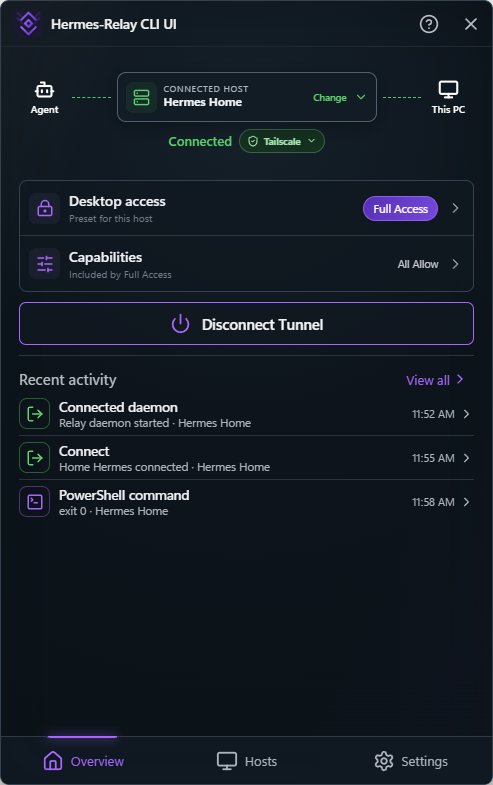
The optional Hermes-Relay CLI UI is a compact popup anchored above its notification-area icon. Click the icon to open or hide it. It manages paired Hermes hosts, connection and daemon state, per-host access, local approvals, activity, updates, and settings. Pairing can be completed directly from Hosts → Pair host with the relay URL and six-character code. Prefer a wss:// URL: the UI labels ws:// connections as unencrypted instead of implying that connectivity provides transport security. It deliberately does not embed chat, the Hermes TUI, a terminal emulator, plugins, voice, or agent sessions.
Access is scoped to the selected host. Restricted keeps the daemon connected without attaching desktop tools. Ask Every Time, the default for a newly paired host, requests local approval for each available command, file, screen/input, or USB operation. Standard enables typed operations but withholds terminal, PowerShell, detached-process, and command-job launch. Full Access is a true override that allows every available capability without task grants for that host; authentication, audit, client revocation, emergency stop, and Windows UAC boundaries still apply. Commands, Files, Screen & Input, Raw USB, Microphone, and Camera share one capability ledger. Individual changes select a matching preset automatically and otherwise become Custom. Existing hosts keep their effective permissions. Raw USB covers direct USB utilities, with ADB shown as a secondary service. Approval requests appear directly as focused local cards, include a bounded command/action preview, and can open the same request in the main UI for full review without requiring a terminal.
The Windows one-liner installs the checksum-verified CLI and UI bundle by default. A CLI-only install can add the UI later with hermes-relay ui install, open it with hermes-relay ui or hermes-relay ui open, and inspect it with hermes-relay ui status. Start UI at sign-in controls the per-user tray startup entry. Start daemon with UI is separate and decides whether opening the UI also connects remote access; it is off for existing installs until explicitly enabled. Neither setting creates a Windows service or automatically elevates the daemon.
Hosts owns Relay-specific management. Select a host card to rename it locally, inspect its connection and pairing/session details, change access or capabilities, deauthorize its clients, re-pair it, or use the guarded Forget host action. Opening the detail page does not silently make that host active. Forget removes the local pairing, display name, and access policy; use client deauthorization when the server-side session must also be revoked.
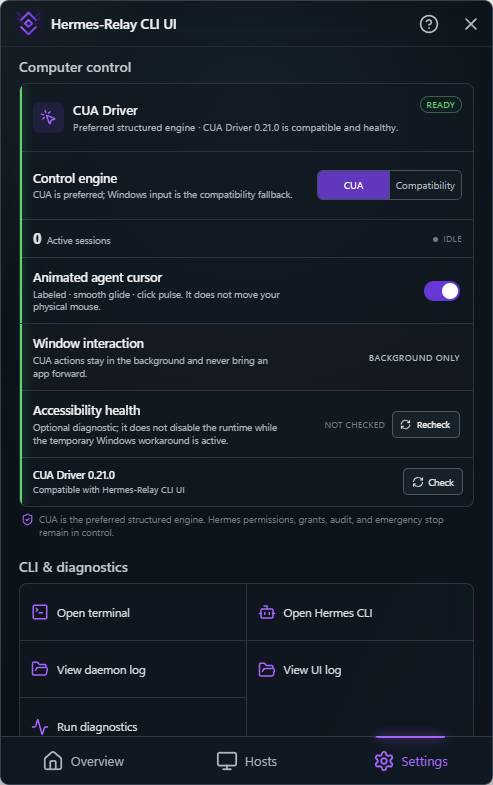
Settings owns this PC. Its daemon section can restart the daemon, explicitly Restart as Administrator... through Windows UAC, or Return to user mode by stopping the elevated daemon once and starting it normally. The UI itself never elevates. Administrator mode is intentionally an action instead of a sticky toggle: approved commands and input actions inherit the daemon's elevated privileges.
The CLI section can Open terminal at a normal prompt, Open Hermes CLI directly into the paired Hermes TUI, View daemon log, or Run diagnostics. Updates manage the CLI and UI bundle together. Help & About shows the UI, CLI, and connected Relay versions and links to the desktop documentation, troubleshooting guide, release notes, logs, and diagnostics. External links open in the default browser.
Settings → Computer control reports whether the preferred CUA Driver engine is absent, incompatible, degraded, or ready. A ready runtime handles structured actions against a named window in the background, and display a separate animated virtual cursor for each agent control session without moving the physical mouse. CUA remains optional: Windows input is the explicit compatibility backend, this release keeps foreground escalation disabled, and the chosen backend cannot change during an active control session. The same card provides explicit Install, Check, and Update actions; none run automatically. See Computer-use engines.
Why both shell AND chat modes?
They're not the same thing:
shellpipes the host's actualhermesCLI through a PTY. You see exactly whatssh you@hermes-host hermeswould show — same banner, same skin, same slash commands. Best for interactive use.chatspeaks the relay's structuredtuichannel (JSON-RPC-over-WSS), renders events as plain lines. Scriptable, pipeable, survives non-TTY environments. Best for automation / CI / one-shot queries.
Use shell when you want to drive interactively; use chat --json from scripts. Chat mode is maintained for automation — it isn't where new features land, and it isn't a desktop chat app (that's hermes-desktop's job).
Related
- Hermes-Relay Android client — same project, same relay, different surface (phone control, voice, bridge).
- Hermes Agent — the agent platform the CLI talks to.
- Herm — optional terminal dashboard plugin installable from the CLI.
- CLI GitHub source —
@hermes-relay/clipackage. - Release notes — tagged
desktop-v*(separate track from Android); historical releases are undercli-v*.