
Git workspace
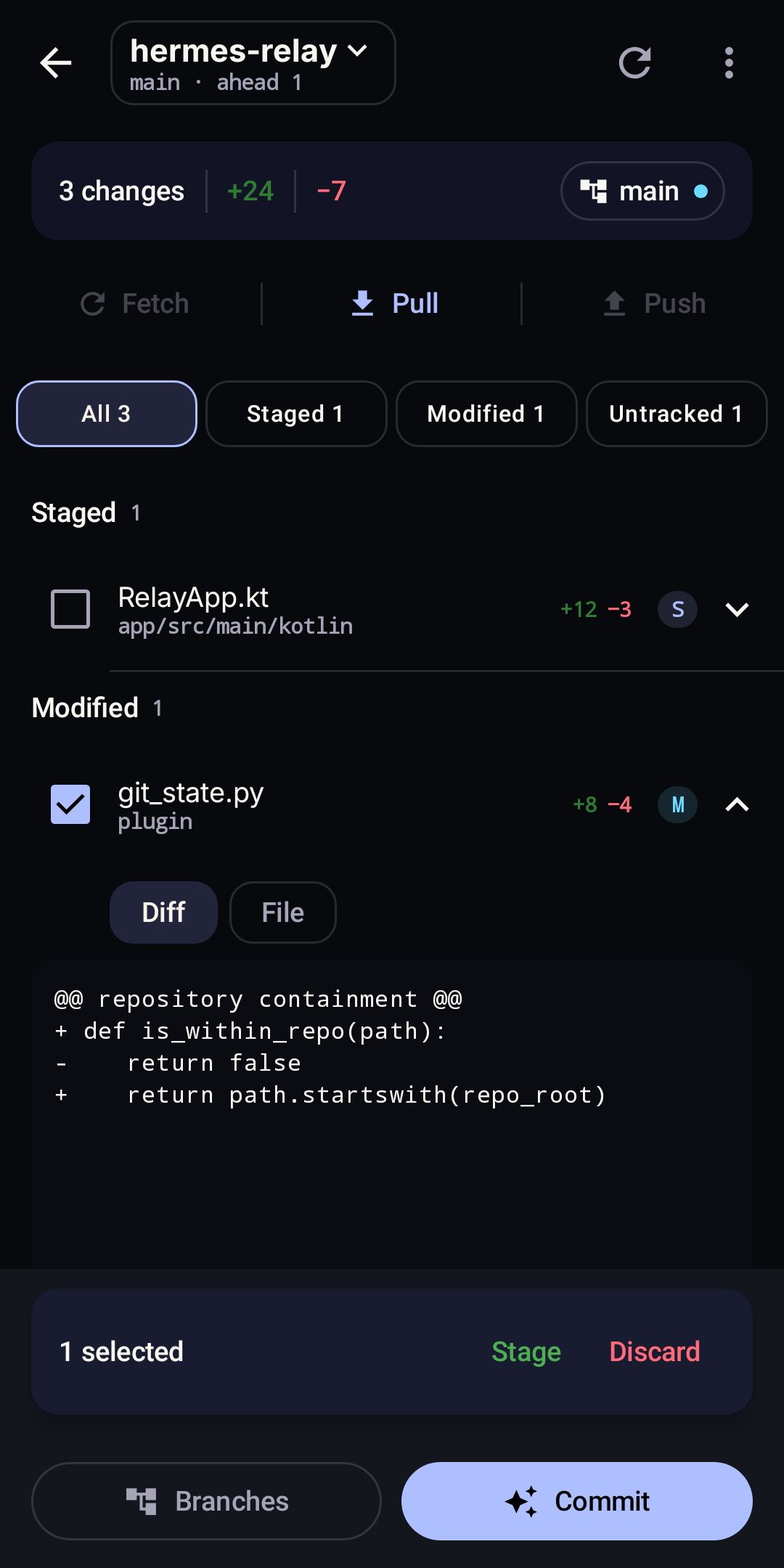
Hermes-Relay Android starts from the active session's upstream cwd, repository root, and branch metadata. The native Git workspace then uses the optional Hermes-Relay plugin for broader host discovery, working-tree detail, diffs, and guarded write operations.
Requirements
- A standard Dashboard connection can identify the active session's repository and branch without Relay.
- The Hermes-Relay plugin must be installed and enabled for full repository discovery, status/diffs, and write operations.
- The Dashboard must expose the plugin's
git/*API routes. - Repositories must be below the host's configured Git discovery root.
- Turn on Host repository scanning for this saved connection. It is off by default and does not carry to another Hermes connection.
- Write actions require the plugin's Allow changes grant.
The active session's upstream metadata is always considered first. Enabling discovery lets Android ask the Relay plugin to scan its configured Git root and return repository paths, branches, and change status. The scan starts only while the Git workspace is open; it is not part of app, connection, Chat, or session startup. Git write permission remains separate.
If Android discovers the Git contribution but the live route is unavailable, the workspace shows a retryable availability message instead of a raw server response.
Open the workspace
Use any of these entry points:
- Tap the branch indicator or change rail above the Chat composer.
- Open Settings → Git workspace.
- Open Settings → Plugins → Hermes-Relay → Git.
The first time, open Settings → Git workspace and turn on Host repository scanning. The same switch can turn discovery back off and immediately clear the connection's locally presented repository state.
When the active chat session reports an exact repository root or working directory, Android selects that context first. Relay discovery can then match it to a richer repository row or offer other repositories in the picker.
Chat controls
The compact Chat rail shows the current branch, unique changed-file count, and tracked line additions/deletions. Open Settings → Chat and turn off Show Git workspace in Chat to hide the Chat indicator and rail. This setting does not disable the full Git workspace. Chat shows Git controls only when host repository scanning is enabled and at least one repository is available.
Review and change files
The workspace groups staged, modified, and untracked files and provides filters, tracked-file content, and staged or unstaged diffs. Binary and untracked files do not expose arbitrary working-tree content through the preview route.
With Allow changes enabled, you can:
- stage modified or untracked files and unstage staged files;
- discard modified content or delete selected untracked files after confirmation;
- create and switch branches, including a recoverable stash-and-switch path;
- generate or enter a commit message and optionally push after committing;
- fetch, fast-forward pull, and push.
Discard, push, and dirty checkout each require a fresh confirmation. Requests remain bound to the selected connection, profile, repository, and repository generation so switching context cannot redirect an already-reviewed action.